Juniper Client

Its all about Networks

  • Juniper SRX
  • Juniper eBooks
  • Juniper Switches
    • Juniper Ex Switch
    • Juniper Networks Switches
    • Juniper Switch
  • Juniper Apps
  • News
  • Juniper eBooks
  • About Us
You are here: Home / Juniper Client / Buy Juniper AC SRX 5800 Chassis SRX5800BASE-AC at Amazon

Buy Juniper AC SRX 5800 Chassis SRX5800BASE-AC at Amazon

July 11, 2013 · 1 min read · vijesh · No comments

  1. Home
  2. Juniper Client
  3. Buy Juniper AC SRX 5800 Chassis SRX5800BASE-AC at Amazon

The SRX5800 Services Gateway is an award-winning next-generation security platform that is based on a revolutionary new architecture that provides market-leading performance, scalability, and service integration. It is ideally suited for service provider, large enterprise and public sector networks.

The SRX5800 supports more than 200 Gbps firewall and 100 Gbps IPS, as well as 400,000 connections per second, and an industry record-breaking 60 million concurrent user sessions.

Equipped with a full range of integrated security features, the massively scalable SRX5800 Services Gateway is ideal for securing large enterprise data centers, hosted or co-located data centers, and service provider infrastructures.

Technical Details
11 x I/O Card, 11 x Services Module

Product Details
Product Dimensions: 23.5 x 17.5 x 27.8 inches ; 394.6 pounds
Shipping Weight: 395 pounds
Item model number: SRX5800BASE-AC

Equipped with the full range of security features, SRX 5800 is ideally suited for securing large enterprise centers and co located data centers. 22 Expansion Slots
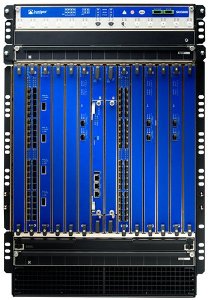
Juniper AC SRX 5800 Chassis SRX5800BASE-AC

List Price: $68,000.00
Price: $60,042.64
You Save: $7,957.36 (12%)

Category: Juniper Client Tags: Juniper AC SRX 5800, Juniper SRX 5800

Related reading

Juniper Client

How to Set Up or Configure VPN (Virtual Private Network) in Windows 7

Virtual Private Network in short VPN is a technology which lets a computer using a public Internet connection to join…

Jul 26, 2013 · 3 min read

7 steps in Configuring Source Based Routing in Juniper NetworksJuniper Client

7 steps in Configuring Source Based Routing in Juniper Networks

Recently we have posted a tutorial on How to Configure Source Based Routing and Source Interface Based Routing. Now we…

Jul 4, 2013 · 2 min read

Juniper Client

Juniper Network Connect Client Download

The Juniper Networks Network Connect is a software package from Juniper Networks that interfaces with its Secure Access hardware and…

Jul 3, 2013 · 2 min read

Leave a Reply Cancel reply

Your email address will not be published. Required fields are marked *

This site uses Akismet to reduce spam. Learn how your comment data is processed.

FIND IT HERE

About Juniper Client

Juniper Client is a blog dedicated in solving juniper related problems like juniper srx load balancing, juniper routers, juniper switches etc. Juniper Client is the premier provider of information, intelligence and insight for Juniper Network and IT Executives. Our main focus is to deliver news, opinion and networking tools for managing business solutions. We offer a unique and valuable information for businesses to meet their marketing objectives. Read More...

About the site

Juniper Client

Juniper Client publishes hands-on engineering guides: configuration walkthroughs, error-by-error troubleshooting and field notes written for people who work on real systems.

Read more about us

Topics

  • News
  • Juniper Tutorials
  • Juniper SRX
  • Juniper Switches
    • Juniper Ex Switch
    • Juniper Networks Switches

Recent articles

  • How to Configure a Site-to-Site VPN: Step-by-Step Guide for Beginners (2026)
  • What is SASE? A Network Engineer’s Guide to Secure Access Service Edge (2026)
  • Juniper SRX vs Fortinet vs Palo Alto: Best Small Business Firewall 2026
  • HPE bolsters autonomous community operations for Mist, Aruba Central
  • Change storm coming: Gartner forecasts value hikes, lengthy lead instances for enterprise knowledge heart switches

Copyright © 2026 · SignalStack on Genesis Framework · WordPress · Log in